


Download Free Folder Monitor – Secure, Lightweight File Monitoring Tool for Windows & Mac
Free Folder Monitor is a powerful yet lightweight file monitoring tool designed to help users track changes in folders and files in real time. Whether you're a developer, system administrator, or someone who needs to keep tabs on sensitive data, this free software provides reliable, accurate monitoring without slowing down your system. With support for multiple folder tracking, customizable file filters, and detailed change reports, Free Folder Monitor ensures you never miss a critical update.
The intuitive interface makes it easy for beginners and experts alike to set up and use. It’s compatible with Windows and Mac, offering seamless integration across platforms. Regular updates ensure security and performance improvements, keeping the tool future-ready.
Download Free Folder Monitor today and take full control of your file environment with confidence.
Why Free Folder Monitor Stands Out in File Monitoring Software
When it comes to file monitoring tools, many options either overload users with unnecessary features or lack essential functionality. Free Folder Monitor strikes the perfect balance by focusing on core performance: real-time file change detection, minimal system impact, and user-friendly design. Unlike resource-heavy alternatives, this software runs efficiently in the background, consuming only a fraction of your CPU and RAM. This makes it ideal for long-term monitoring tasks without compromising your device’s speed.
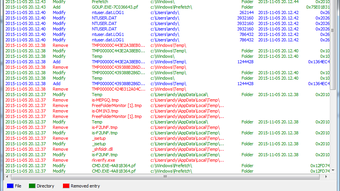
One of its standout features is the ability to monitor multiple folders simultaneously. Whether you’re tracking a project folder, a shared network drive, or a backup directory, Free Folder Monitor can handle it all. The software logs every file operation—create, delete, rename, modify—with precise timestamps and file paths. These logs are stored in detailed reports, which can be exported as CSV or text files for audit purposes or further analysis. This is particularly useful for compliance, version control, or troubleshooting unexpected file changes.
Another major advantage is the customizable file filter. You can specify which file types (e.g., .txt, .pdf, .exe) or extensions to monitor, reducing noise and focusing only on relevant changes. This level of control ensures you’re alerted only when important files are modified, making the tool highly efficient.
Additionally, the interface is clean and intuitive, with drag-and-drop folder addition and real-time status indicators. Even users with minimal technical knowledge can set up monitoring in minutes. With regular updates and a secure architecture, Free Folder Monitor remains a trustworthy choice for both personal and professional use.
Easy Setup and Powerful Monitoring Capabilities
Getting started with Free Folder Monitor is a breeze. The download is quick and free, with no registration required. Once installed, the software launches with a simple dashboard that displays all monitored folders and their current status. To begin monitoring, simply click “Add Folder,” browse your system, and select the directory you want to track. The process is entirely drag-and-drop friendly, and you can monitor folders across different drives or network locations.
After adding a folder, you can customize the monitoring behavior. For instance, you can choose to monitor only specific file types using the built-in filter. You can also set up notification preferences—such as pop-up alerts, sound cues, or email notifications—when a change occurs. This is especially helpful if you’re monitoring a critical system folder or a shared workspace where changes need immediate attention.
The software supports recursive monitoring, meaning it tracks subfolders and nested directories automatically. This ensures no change goes unnoticed, even deep within a project structure. Every monitored event is logged with full metadata, including the file name, path, type of change, and timestamp. These logs can be viewed in real time or exported later for audits or reporting. For advanced users, the tool also supports command-line execution, allowing automation via scripts or batch files.
One of the most impressive aspects is how lightweight the software remains. Even with multiple folders and high-frequency changes, Free Folder Monitor uses minimal system resources. This makes it suitable for use on older machines or in environments where performance is critical. Whether you're using it on a Windows PC, Mac, or even a low-spec laptop, you’ll experience smooth, uninterrupted operation.
Compatibility, Security, and User-Friendly Features
Free Folder Monitor is designed for broad compatibility, supporting both Windows and Mac operating systems. It works seamlessly on Windows 10, 11, and macOS Ventura, Sonoma, and earlier versions. The software is available as a portable version, so you can run it directly from a USB drive without installation—perfect for temporary use or on shared computers.
Security is a top priority. The software operates with standard user permissions and does not require admin rights to run, reducing the risk of unintended system changes. All monitoring data is stored locally on your device, ensuring privacy and compliance with data protection standards. There are no telemetry or data collection practices—your monitoring logs stay private and secure.
Additional features enhance usability: real-time status indicators, customizable alerts, exportable reports, and a clean, modern UI. The tool also includes a built-in search function to quickly locate specific file changes in the logs. For teams, this means better collaboration and accountability, especially when multiple users access shared folders.
Regular updates ensure compatibility with new OS versions and patch any potential vulnerabilities. The developers are responsive to user feedback, and the community forum offers helpful guides and troubleshooting tips. With no ads, no in-app purchases, and a fully free version, Free Folder Monitor delivers exceptional value.
Key Features of Free Folder Monitor
- Real-time file change detection (create, delete, rename, modify)
- Monitor multiple folders simultaneously with recursive tracking
- Customizable file filters by extension or type
- Export detailed change logs as CSV or text files
- Lightweight performance with minimal system resource usage
- Support for Windows and Mac (including portable version)
- Notification alerts via pop-ups, sounds, or email
- Command-line interface for automation and scripting
- Secure, private logging with no data collection
- Intuitive drag-and-drop interface and real-time status display
Pros and Cons
Pros
- Completely free with no hidden costs
- Lightweight and efficient—no lag on system performance
- Supports both Windows and Mac platforms
- Easy to set up and use, even for beginners
- Powerful filtering and reporting features
- Portable version available for USB use
- Regular updates and strong security practices
Cons
- No mobile version (Android/iOS) available yet
- Basic UI—some users may prefer more advanced customization
- Limited to file monitoring; no backup or sync features
Frequently Asked Questions (FAQ)
Is Free Folder Monitor really free to download and use?
Yes, Free Folder Monitor is completely free to download and use with no time limits, ads, or in-app purchases. The full feature set is available in the free version, making it a top choice for budget-conscious users.
Can I monitor folders on both Windows and Mac?
Absolutely. Free Folder Monitor is compatible with Windows 10/11 and macOS Ventura/Sonoma and earlier versions. The software is available for both platforms, ensuring consistent performance across devices.
Does Free Folder Monitor slow down my computer?
No, it’s designed to be lightweight and efficient. The software uses minimal CPU and RAM, even when monitoring multiple folders. You’ll experience smooth performance without noticeable lag.
Can I export monitoring logs for reporting?
Yes, you can export detailed change logs as CSV or plain text files. This is ideal for audits, compliance checks, or sharing with team members.
Is there a mobile version for Android or iOS?
Currently, Free Folder Monitor is only available for Windows and Mac. There is no mobile version, but the developers have hinted at future updates.
Final Thoughts: A Must-Have for File Integrity and Monitoring
If you’re looking for a reliable, secure, and free file monitoring solution, Free Folder Monitor delivers exceptional value. Its lightweight design, real-time tracking, and powerful filtering make it a standout choice for both personal and professional use. Whether you're protecting sensitive data, managing project files, or ensuring system integrity, this tool provides peace of mind with minimal effort.
With no ads, no hidden fees, and continuous updates, Free Folder Monitor proves that high-quality software doesn’t have to come at a price. Its compatibility with Windows and Mac, combined with a user-friendly interface, ensures broad accessibility. The ability to export logs and receive instant alerts makes it a valuable asset for teams and individuals alike.
Don’t wait—download Free Folder Monitor today and take full control of your file environment. Whether you're a developer, IT professional, or simply someone who values data security, this tool is a must-have addition to your digital toolkit.
Download Free Folder Monitor now and monitor your files with confidence—secure, free, and hassle-free.







